

Q0021 – How do I find or read the server logs files?
NOTE:
The following works from version 5.2.8 and forward.
Step 1
Start by executing the transaction: /APPLISOL/LOGS
This action will take you directly to the log files interface.
Step 2
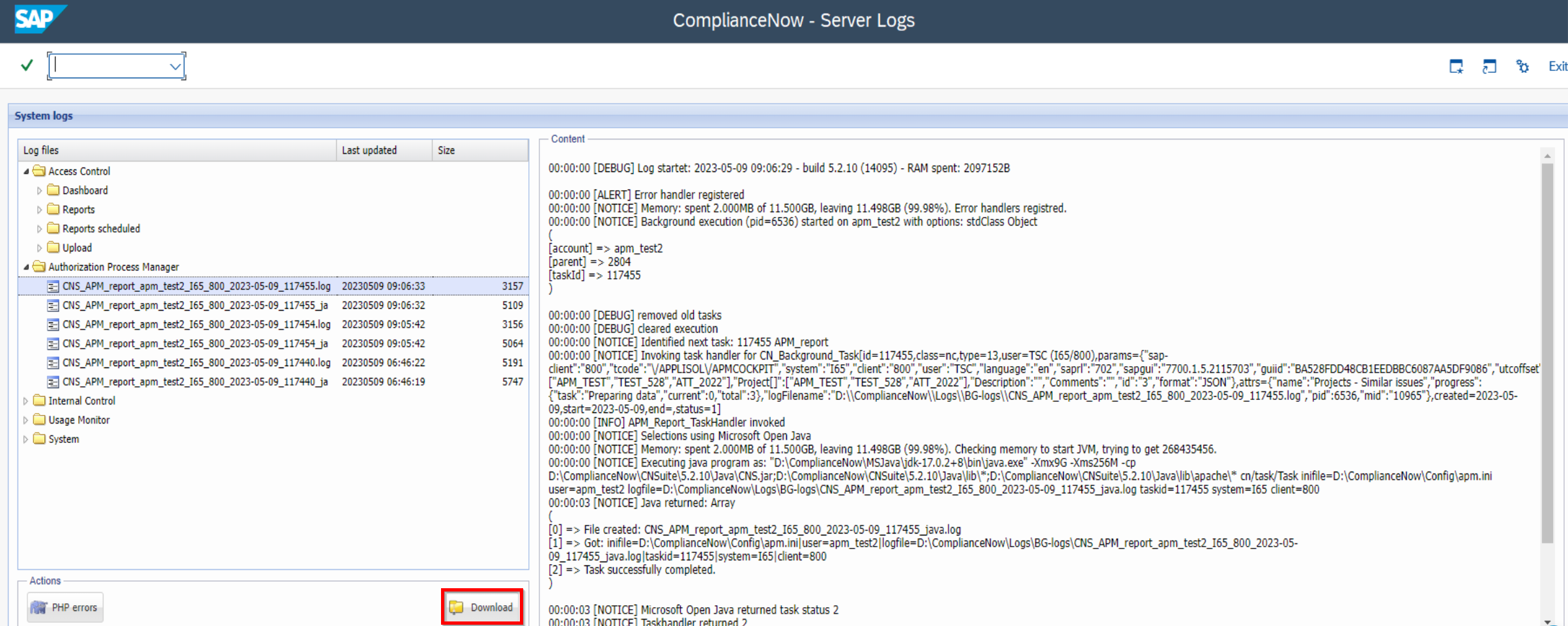
Once in the logs interface, navigate to the relevant CN component folder.
This folder contains categorized logs relevant to the specific ComplianceNow component.
Step 3
Within any given CN component folder, you have the option to view specific log files.
These files are available for online viewing.
Step 4
If you require a local copy of the logs for detailed examination or record-keeping, click the “Download” button.
This will enable you to download a zipped file containing the entire collection of log files available in the list.
Do you need our help to resolve your challenge?
Please feel free to get in touch with us.

